WooCommerce Rate & Gateway Rules

The Right Shipping and Payment Options for Every B2B Customer

Invoice payment only for approved trade accounts, freight only for heavy orders, no cash on delivery for export.
One rule screen for shipping and payment methods, with the B2B conditions built in.

Roles & Wholesale

Tax-Exempt Customers

Cart & Weight

Fees & Discounts (Pro)

Table Rates (Pro)

Checkout Block Ready

WooCommerce Shows Every Customer the Same Checkout. B2B Stores Can't Work That Way.

Trade accounts pay by invoice, retail customers pay up front, pallets go by freight and parcels by courier. WooCommerce can’t tell them apart at checkout, so stores stack several plugins or take orders they can’t fulfil. AovUp Rate & Gateway Rules decides it for each customer and each cart.

Shipping Rates and Payment Gateways in One Place

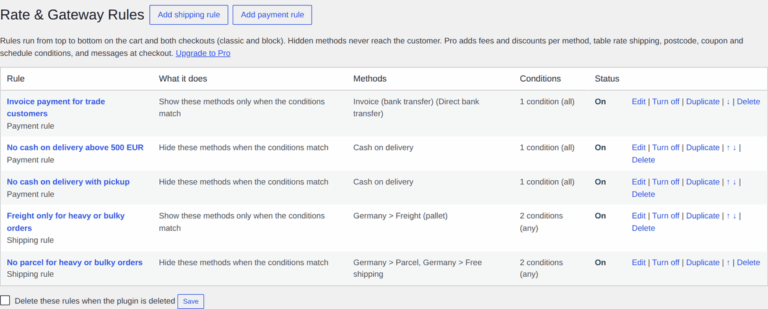
Hide a method, or show it only when the conditions match. The same rule screen covers shipping methods and payment gateways, so you don’t need a plugin for each. Rules run from top to bottom, and you can turn them on and off, duplicate them and reorder them.
B2B Conditions Built In

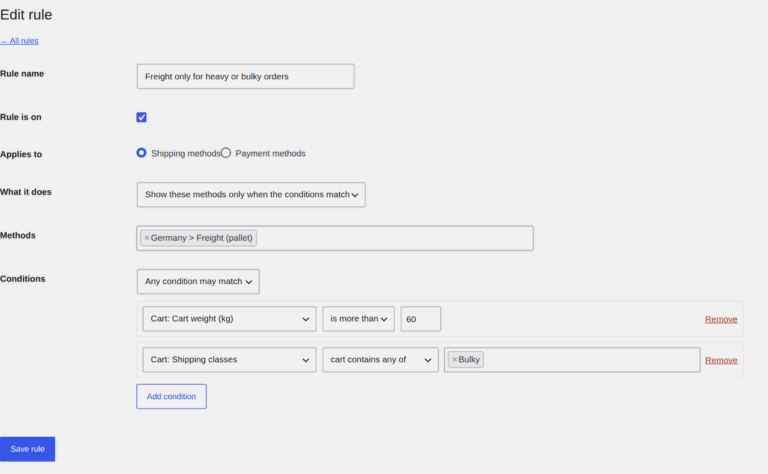
Customer role, with an “any wholesale role” shortcut, guests, and tax-exempt customers from AovUp Tax Exemption or WooCommerce. Add the cart subtotal, weight, number of items, products, categories, shipping classes, countries and the chosen shipping method, then match all of them or any.

Fees and Discounts per Method (Pro)

Add a cash-on-delivery fee, give 2% off for bank transfer or charge for freight handling. Use a fixed amount or a percentage of the cart plus shipping, taxable or not. The total updates as soon as the customer switches method, on the classic checkout and the Checkout block.

Table Rate Shipping (Pro)

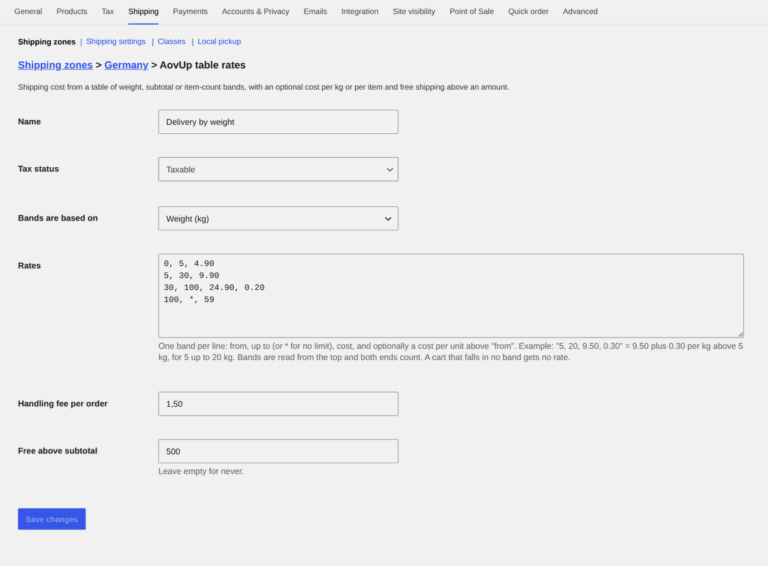
Price shipping in bands by weight, subtotal or number of items, with a cost per kg or per item, a handling fee and free shipping above an amount. Then use the same rules to decide which customers see it.

More Features Built for B2B Stores

Postcode Rules (Pro)

Wildcards and ranges such as 10* or 10115-10999, for local delivery zones and remote areas.

Coupons (Pro)

Offer or remove a shipping or payment method when a coupon is used.

Schedules (Pro)

Weekday and time-of-day conditions for same-day delivery and pickup slots.

Customer History (Pro)

Paid orders and total spend, so invoice payment can wait until a customer's second order.

Checkout Messages (Pro)

Tell customers why a method isn't offered instead of leaving them guessing.

Import & Export (Pro)

Move your rules between a staging site and the live store in one file.

Both Checkouts

Works on the Cart and Checkout blocks and on the classic checkout.

No Back Doors

A hidden method can't be used through a hand-made checkout or Store API request.

HPOS Compatible

Declared compatible with WooCommerce High-Performance Order Storage (HPOS).

FeatureWooCommerce aloneAovUp Rate & Gateway Rules
Payment methods by customer role✕Same for everyone✓Role, wholesale group, guests
Show or hide shipping methods by weight or products✕Not possible✓Weight, items, products, categories, classes
Tax-exempt customers✕Not possible✓Built-in condition
Fees and discounts per method✕Not possible✓Fixed or %, taxable or not (Pro)
Table rates✕Flat rate formulas only✓Weight, subtotal and item bands (Pro)
Payment methods by postcode, coupon or schedule✕Not possible✓Included (Pro)

Rate & Gateway Rules for B2B Stores

Annual
Lifetime

Pro

$6.59 / mo
(billed annually)
  • 1 Site
  • 1 Year Support & Updates
  • Every Pro Feature
  • Risk-Free Guarantee

Pro

$199 / One-time
  • 1 Site
  • Lifetime Updates
  • Every Pro Feature
  • Risk-Free Guarantee

Have a question? Send us an email at hello@aovup.com or click the icon in the right corner of the screen

Our 100% No-Risk Money Back Guarantee!

We’re excited to have you experience AovUp. Over the next 14 days, if AovUp isn’t the best fit, simply reach out! We’ll happily refund 100% of your money..

Brian Harris
Founder, AovUp

FAQ

Most frequent questions and answers

We offer no-questions-asked refunds to all customers within 14 days of your purchase. If you are not satisfied with our product, then simply send us an email and we will refund your purchase right away. 

Our products will work with the WordPress.com Business Plan, which allows the installation of third party themes and plugins.

Your product will still operate even if you cancel the automated renewal subscription for the yearly plans, but you won’t get updates and support after the license expires.

Yes, you have the option to purchase our plugins individually. 

Yes, you can upgrade at any time after signing up. You will see a notice regarding your current package and instructions on how to upgrade.

If you have not found the answer to your question here, get in touch and we will be happy to help.

The plugin is working well and support helped me solving an issue with my website. I just gave admin user and they fixed it in a moment
Working perfectly, great support
⭐⭐⭐⭐⭐
Ivan trp
It works by default, it’s settings are where they should be (not creating a new item at the admin menu, making it harder to find things).
Great and clean alternative ⭐⭐⭐⭐⭐
Juanzo
Super impressed with the user interface and the fact all functionality is configured within the product editor

Works Great in latest Woo and WP! ⭐⭐⭐⭐⭐
@chickwithbob
Works Great in latest Woo and WP!
Works Great!
⭐⭐⭐⭐⭐
Natacha
Good plugin. Helped me, thanks
⭐⭐⭐⭐
thywordpress
This plugin displays color swatches in the WooCommerce sidebar, allow my customers to quickly preview. Thanks a Lot
⭐⭐⭐⭐⭐
wdsydney
Beautifys your variations, simplifys backend
⭐⭐⭐⭐
thatLeo
Very useful plugin
⭐⭐⭐⭐
Saurabh Jain
Works flawlessly. Thanks for that
⭐⭐⭐⭐⭐
Larzans