
Search by Name or SKU
Type part of a name or a code, pick a match with the arrow keys or press Enter for the first one. Variations are listed on their own, with their SKU and the customer’s own price.
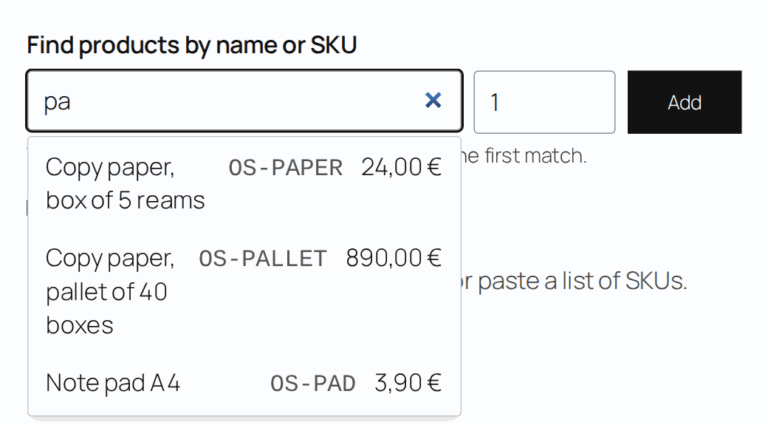
Search by name or SKU, paste a list from a spreadsheet and add everything to the cart at once.
Saved lists and quick reorders bring repeat buyers back faster.
A trade customer reordering 30 items shouldn’t have to open 30 product pages. They have the codes in a spreadsheet or on last month’s invoice. AovUp Quick Order Form turns that list into a cart in one step.
Type part of a name or a code, pick a match with the arrow keys or press Enter for the first one. Variations are listed on their own, with their SKU and the customer’s own price.
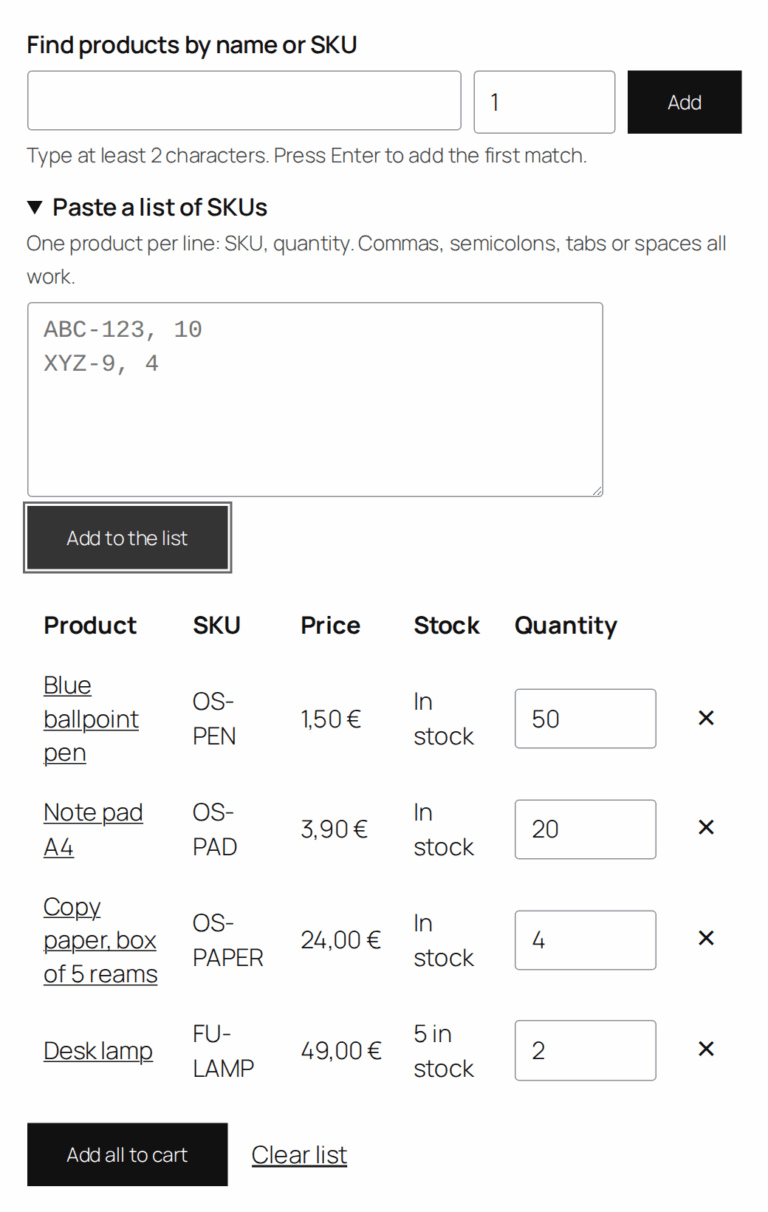
Copy SKUs and quantities from a spreadsheet or an email into the paste box. Each line goes into the cart the same way the product page adds it, so stock limits and wholesale prices apply. Lines that can’t be added stay in the list with the reason.
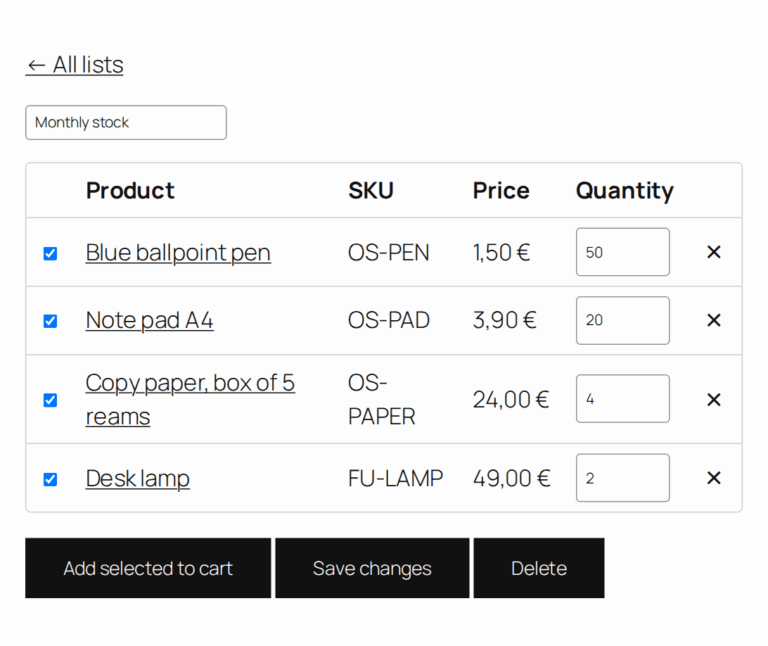
Buyers keep lists for their regular orders: once signed in, they add products to a list from the product page, save the whole cart as a list, and load a list into the form or straight into the cart from My Account.
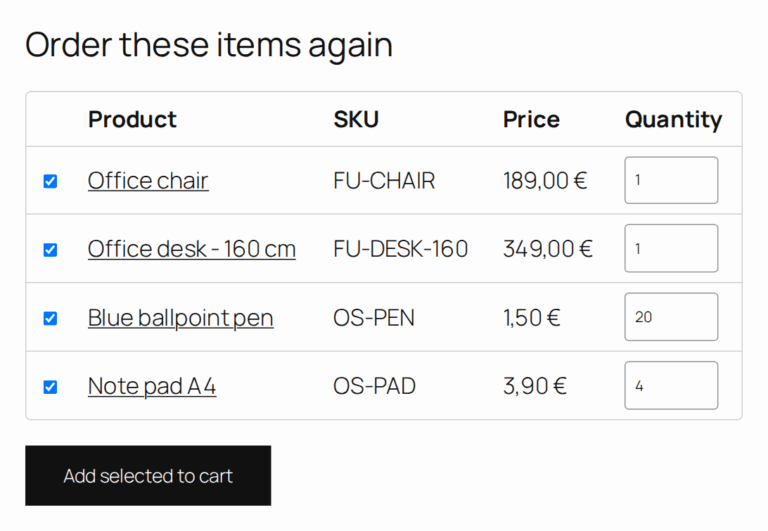
An “Order again” button sits next to each past order in My Account, for the order statuses you choose. With Pro, buyers can pick items and quantities from an old order and add only those.
Upload a CSV with SKU and quantity columns straight into the form.
Quick order and Saved lists tabs in My Account, just above Log out.
Show the form and saved lists only to the roles you choose, such as wholesale customers.
Use the Quick order form block or the [aovup_quick_order] shortcode, or let the plugin create the page.
Stock limits and minimum and maximum quantities apply to every line.
Every customer sees their own price, wholesale prices included.
Arrow keys, Enter and screen-reader labels throughout the form.
The Mini-Cart block and classic mini carts update straight away.
Declared compatible with WooCommerce High-Performance Order Storage (HPOS).
| Feature | WooCommerce alone | AovUp Quick Order Form |
|---|---|---|
| Order by SKU | ✕Search the shop, one page per product | ✓Type or paste SKUs |
| Add many products at once | ✕One product at a time | ✓A whole list in one click |
| Saved lists per buyer | ✕Not possible | ✓Included (Pro) |
| Order again | ✕Completed orders only, every item | ✓Statuses you choose; pick items (Pro) |
| CSV upload | ✕Not possible | ✓Included (Pro) |
| Only for trade customers | ✕Not possible | ✓Limit by role (Pro) |
Pro
Pro
Have a question? Send us an email at hello@aovup.com or click the icon in the right corner of the screen

We’re excited to have you experience AovUp. Over the next 14 days, if AovUp isn’t the best fit, simply reach out! We’ll happily refund 100% of your money..

Brian Harris
Founder, AovUp
We offer no-questions-asked refunds to all customers within 14 days of your purchase. If you are not satisfied with our product, then simply send us an email and we will refund your purchase right away.
Our products will work with the WordPress.com Business Plan, which allows the installation of third party themes and plugins.
Your product will still operate even if you cancel the automated renewal subscription for the yearly plans, but you won’t get updates and support after the license expires.
Yes, you have the option to purchase our plugins individually.
Yes, you can upgrade at any time after signing up. You will see a notice regarding your current package and instructions on how to upgrade.
If you have not found the answer to your question here, get in touch and we will be happy to help.